Have you noticed a drop in website traffic even though you are regularly publishing content and working on SEO? A sudden decline in organic traffic can be frustrating, especially when your website was previously receiving consistent visitors from Google.
A website traffic drop issue does not always mean that your entire SEO strategy has failed. Traffic can decrease because of ranking changes, technical SEO problems, indexing issues, changes in search behaviour, outdated content, lower click-through rates, or stronger competition. The important thing is to identify why your website traffic is dropping before making major changes to your website.
In this guide, we will explore seven common reasons for a website traffic drop and explain practical steps you can take to diagnose and fix the issue.
Why Is Your Website Traffic Dropping?
Before I try to bring the website traffic that was lost I need to understand what really changed. Website traffic can fall slowly over weeks. It can drop fast in a few days. The first step is to look at website traffic and compare it with how it used to be.
Use tools like Google Search Console and Google Analytics to look at:
- Traffic
- Search impressions
- Clicks
- position
- Click‑through rate
- Pages
- Top keywords
- Sources of traffic
- Indexed pages
If website traffic is falling do not rush to content or change every page. First find out whether the drop is due to rankings, technical problems, content quality, indexing or how visitors behave on the site.
- Google Algorithm Changes
One reason website traffic might be falling is a change in Google’s search algorithms.
Google keeps updating its search systems to give users results. When these updates happen some sites might see their rankings change.If website traffic is dropping around the time of a Google update check performance before the update and after the update.An algorithm update does not always mean a penalty. Rankings may change because Google altered how it evaluates relevance, quality or other signals.
What Can You Do?
Start by looking at which pages lost website traffic.
Check:
- Pages that had the drop in traffic
- Keywords that lost rankings
- Search queries that lost impressions
- Pages that used to get clicks
Then examine the content and compare it with pages that perform well for the search intent.
Focus on making content original and relevant rather than making random SEO changes.
- Your Keyword Rankings Have Dropped
Another reason for website traffic falling is when keyword rankings drop.
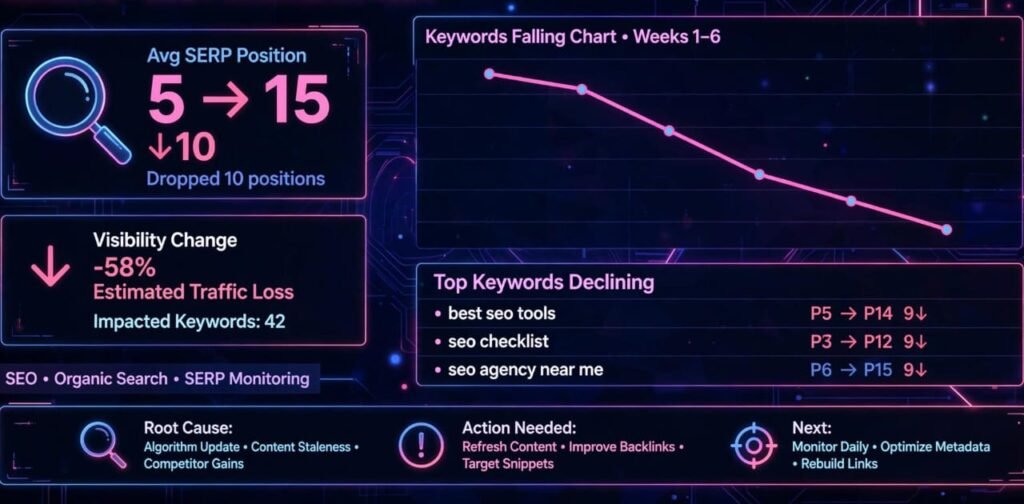
For example, imagine a page was in position 5 for a keyword. If it falls to position 15, that page could get clicks. Even a small ranking shift can hurt website traffic when the keyword has searches. Use Google Search Console to find the keywords that have changed in ranking.
Look at:
- Position
- Average position
- Previous clicks
- Current clicks
- Previous impressions
- Current impressions
If a keyword is not performing well check the page that targets it.
Ask:
- Is the content still up to date?
- Does it match what people are looking for?
- Is the information current?
- Are the pages more complete?
- Does the page have a structure?
- Are the title and meta description good?
Improving the page based on these points can help fix why website traffic is dropping.
- Technical SEO Problems
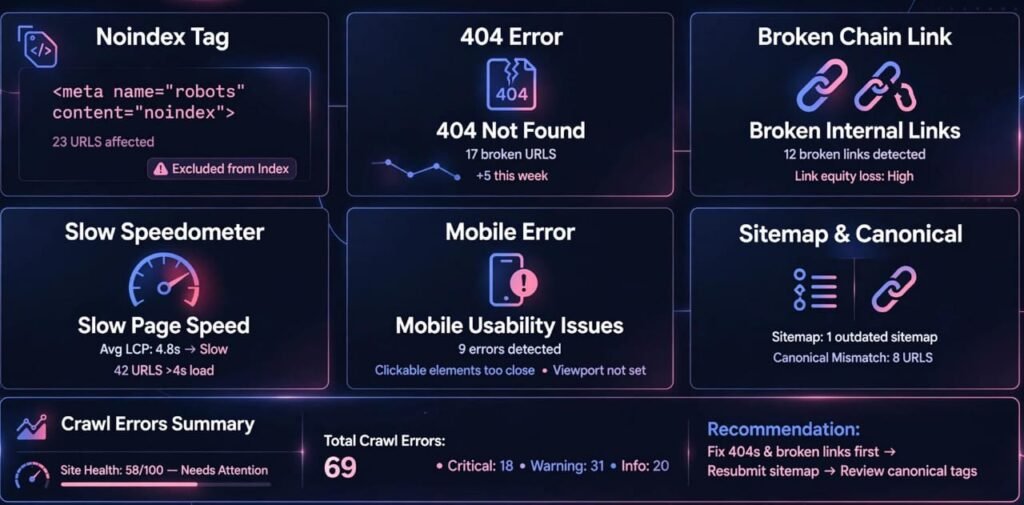
Technical SEO problems can also cause website traffic to fall.Content may be great. Search engines need to crawl, understand and index pages properly.
Common technical SEO problems include:
- Pages that are accidentally marked as noindex
- Links
- Wrong canonical tags
- 404 errors
- Redirect issues
- Slow page loading
- Specific technical issue
- Duplicate content
- Crawl issues
- Sitemap problems
For example if a key service page gets a noindex tag by mistake Google might stop showing it in search results.
How to Check Technical Issues
Google Search Console is one of the tools for finding these problems.
Check the indexing section. Look at:
- Indexed pages
- Pages not indexed
- Indexing errors
- Sitemap status
- URL inspection results
The URL Inspection tool can also check if an important page is ready for indexing.If technical problems are causing website traffic to fall fix them before changing content.
- Your Content Has Become Outdated
Search results change over time.
A blog post that did well a year ago might now contain information that users do not find useful. This is another reason why website traffic may fall. For example, digital marketing, SEO tools, social media features and search engine practices change often. Old screenshots, data, strategies or features that are no longer available can make a page less useful.
How to Update Old Content
Start with pages that used to bring in a lot of website traffic.
Check:
- Data
- Examples
- Broken links
- Images
- Incorrect information
- Missing parts
- Tools or features
- Search intent
I recommend updating the content with the most accurate and helpful information.Do not merely change the date. Make sure the real content is better.Add FAQs, examples, tables, step‑by‑step guides and internal links when they truly help readers.Updating content can help if website traffic drops because your pages are no longer relevant.
- Your Search Click‑Through Rate Has Decreased
Sometimes your rankings and impressions stay the same. The number of clicks drops.In this case website traffic dropping might be caused by a low click‑through rate.Click‑through rate or CTR measures how often people click your search result after seeing it.
For example,
If 1,000 people see your search result and 50 click, your CTR is 5%. A lower CTR can hurt website traffic even if the page still shows up in search results.
How Can You Improve CTR?
Check your page titles and meta descriptions.Your title should clearly say what the page is about and match what people are looking for.
For example, instead of a title like
SEO Tips
you could use something like:
10 SEO Tips to Increase Organic Traffic
Your meta description should also explain what the user will get from the page. Avoid headlines. The title and description should match the content. If website traffic drops but impressions are still present, CTR is something you should look into.
- Your Competitors Are Creating Better Content
SEO is competitive.
Even if your website has not changed other websites might have improved their content earned links made their site easier to use or created resources.As a result website traffic dropping could be because competitors are getting noticed.That is why checking your competitors is part of SEO.
What Should You Compare?
Pick some of the keywords where your rankings dropped.Then look at the pages that are now ranking for those keywords.
Check:
- Depth of content
- Search intent
- Page layout
- Headings
- Examples
- Images
- Links
- User experience
- Page speed
- Freshness of content
The goal is not to copy competitors.
Instead see what users might still need and create something based on your knowledge and research.If competitors are answering questions your page does not adding those parts can make your content stronger.
- Search Behaviour Has Changed

Not every drop in website traffic is because of an SEO mistake. Search habits can change over time. People might use keywords, look for types of information or use ways like AI search, videos, social media, maps or other sources to find information. Seasonality can also affect traffic.
For example
A website about a product might get traffic during some months and less during others.So always compare your performance with a time
Of looking at the seven days compare:
- Month over month
- Year over year
- Traffic trends
- Landing pages
- Search terms
This helps you see if website traffic dropping is a short‑term change or a longer trend.
How to Find the Exact Reason for a Traffic Drop
If you want to diagnose a website traffic drop issue in a way follow a simple process.
Step 1: Check Google Search Console
Open Google Search Console. Look at your Performance report. I find this step helpful to spot traffic drop early.
Look at:
- Clicks
- Total impressions
- Average CTR
- Average position
Change the date range and compare the current period with the previous period. This helps you see if a traffic drop happened recently. Identify the pages and queries with the changes. These are the ones where traffic drop’s most visible.
Step 2: Check Your Top Pages
Find out which pages lost the clicks. Traffic drops can often be hidden across different pages.
A website-wide traffic decline may actually be caused by a few important pages losing rankings. Look at those pages first. Create a list of affected URLs. Investigate each page separately. That way, you can pinpoint the cause of the traffic drop.
Step 3: Check Keyword Rankings
Look for keywords that experienced ranking changes. Those changes often drive a traffic drop. If multiple keywords related to the topic have declined, investigate the page targeting that topic. That page might be the root of the traffic drop.
Step 4: Check Indexing
Make sure your important pages are still indexed. Indexing is key to keeping traffic steady.
Check Google Search Console, for pages that’re
- Crawled but not indexed
- Discovered but not indexed
- Blocked
- Excluded
- Marked as noindex
Indexing problems can contribute to a website traffic drop situation. Fixing them can lift traffic again.
Step 5: Check Technical SEO
Review your website for:
- Broken pages
- Redirect errors
- Specific technical issue
- Slow-loading pages
- Canonical problems
- Sitemap problems
- Internal linking issues
Fix technical problems before making unnecessary content changes. That will help stop traffic drop.
How to Recover From a Website Traffic Dropping Problem
Once you find the cause, craft a recovery plan. I found this works best. Do not make changes at once because it becomes hard to see which change caused the results to shift. I have seen this happen. Instead prioritize the pages and problems that matter the most. We should focus on the issues.
Improve Existing Content
Update pages that have lost rankings but still attract search demand. I always update these first.
Improve:
- Content quality
- Search intent alignment
- Headings
- Examples
- Internal links
- FAQs
- Images
- Readability
Strengthen Internal Linking
Internal links help users and search engines find pages. I have found that internal links boost navigation.
For example,
If you run a blog about SEO, you can naturally link to your SEO services page when you talk about SEO implementation. Use anchor text and link only when the destination is truly useful to the reader.
Improve Page Experience
Make sure your website is easy to use on both desktop and mobile devices. I test it on both.
Check:
- Loading speed
- Font readability
- Navigation
- Mobile layout
- Button visibility
- Content spacing
- Pop-ups
A page experience makes it easier for visitors to read your content. I see visitors stay longer.
Create Supporting Content
If one key page covers a topic create related supporting articles. I create a series of articles around the topic.
For example a digital marketing website could create content around:
- Keyword research
- On-page SEO
- Technical SEO
- Local SEO
- Google Ads
- Social media marketing
- Content marketing
These pages can be linked together through a logical internal linking structure. I map out the links before publishing.
Website Traffic Dropping: An SEO Checklist
Before making major changes use this checklist:
☐ Check Google Search Console
☐ Compare current and previous traffic
☐ Identify pages that lost clicks
☐ Check keyword ranking changes
☐ Review CTR
☐ Check indexing status
☐ Review technical SEO
☐ Check, for broken links
☐ Review outdated content
☐ Analyse competing pages
☐ Check seasonal changes
☐ Improve internal linking
☐ Update important pages
☐ Monitor results after making changes
This approach helps you investigate the real reason instead of reacting to the traffic drop without enough data. I recommend staying patient.
Frequently Asked Questions
Why is my website traffic dropping suddenly?
Website traffic can drop suddenly for reasons. It may happen because your site changes how it ranks because the way search engines look at your site changes or because search engine rules change. Updates to your content, actions by sites or changes in how people search can also cause a drop.
Use Google Search Console to discover which pages and which search terms caused the trouble.
How do I check why my organic traffic is dropping?
Start by looking at Google Search Console. Compare how times people clicked on your site how many times your site showed up in searches the click‑through rate and where your site appears in search results. Then see which pages and which keywords changed the most.
Can outdated content cause website traffic dropping?
Yes. If your content is old. No longer matches what people are looking for it may not perform well in search results. Updating the information and making the page more helpful can make your content more relevant.
Can technical SEO problems reduce website traffic?
Yes. Technical SEO problems can reduce website traffic. Issues such as blocking search engines from showing your pages problems with how search engines crawl your site links, incorrect settings for the main page and problems with how your site is added to search engine indexes can all hurt how visible your site is.
How long does it take to recover lost SEO traffic?
There is no fixed recovery time. How long it takes depends on why the traffic dropped, what changes were made, how much competition there is, how quickly search engines can see and understand your site and how they judge your updated pages. Keep checking the affected pages. Wait for improvement.
Final Thoughts
Website traffic dropping can happen for many reasons, so the first step should always be to find out what is going on. Instead of changing your whole SEO plan right away, use data from Google Search Console and Google Analytics to see what changed. Look at your rankings, how often your site shows up in searches, the click‑through rate, how many pages are indexed, how your site is set up for search engines, how fresh your content is, what your competitors are doing and how people are searching. Once you know what caused the drop, make changes that focus on the problems. Keep watching how things improve over time. SEO is something that needs to be done all the time. Rankings and traffic can go up and down. A clear plan can help you find problems and make choices. If your website traffic is dropping, don’t just look at the number of visitors. Look into which pages lost traffic, which keywords changed and why those changes happened. That information gives you a place to start when trying to improve your website’s performance in search results.
Want to learn more about my digital marketing services? Explore my website